
MergeHelper vs. PullRequestMenu
PullRequestMenu is a simple GitHub pull request menubar app for macOS. MergeHelper tracks pull requests and merge requests across both GitHub and GitLab. Here is how they compare.
PullRequestMenu is designed as a straightforward, no-frills tool for tracking GitHub pull requests from your Mac menubar. It focuses on simplicity and quick access to your PRs without adding complexity or extra features. If you work exclusively on GitHub and want a lightweight menubar tool, PullRequestMenu is built for that workflow.
MergeHelper is designed for developers and teams who split their work between GitHub and GitLab. Instead of managing pull requests on GitHub separately from merge requests on GitLab, MergeHelper brings all PRs and MRs into one unified menubar list. You see everything in one place without context switching.
The key difference: PullRequestMenu is a GitHub-only tool that emphasizes simplicity and quick access. MergeHelper is a cross-platform code review tool that unifies both GitHub and GitLab in one interface with a more comprehensive feature set.
If you work exclusively on GitHub and want the simplest possible menubar tool, PullRequestMenu stays minimal and focused. If you split your work between GitHub and GitLab, MergeHelper provides a unified view that reduces the need for multiple tools.
Quick comparison
| Feature | MergeHelper | PullRequestMenu |
|---|---|---|
| GitHub support | ✓ | ✓ |
| GitLab support | ✓ | - |
| Unified GitHub + GitLab list | ✓ | - |
| Simple, lightweight design | ✓ | ✓ |
| macOS menubar app | ✓ | ✓ |
| Status and metadata context | ✓ | Basic |
| GitHub Enterprise support | ✓ | ✓ |
| Pricing | Free (up to 3 PRs/MRs) $12 one-time for unlimited |
Varies |
Screenshots
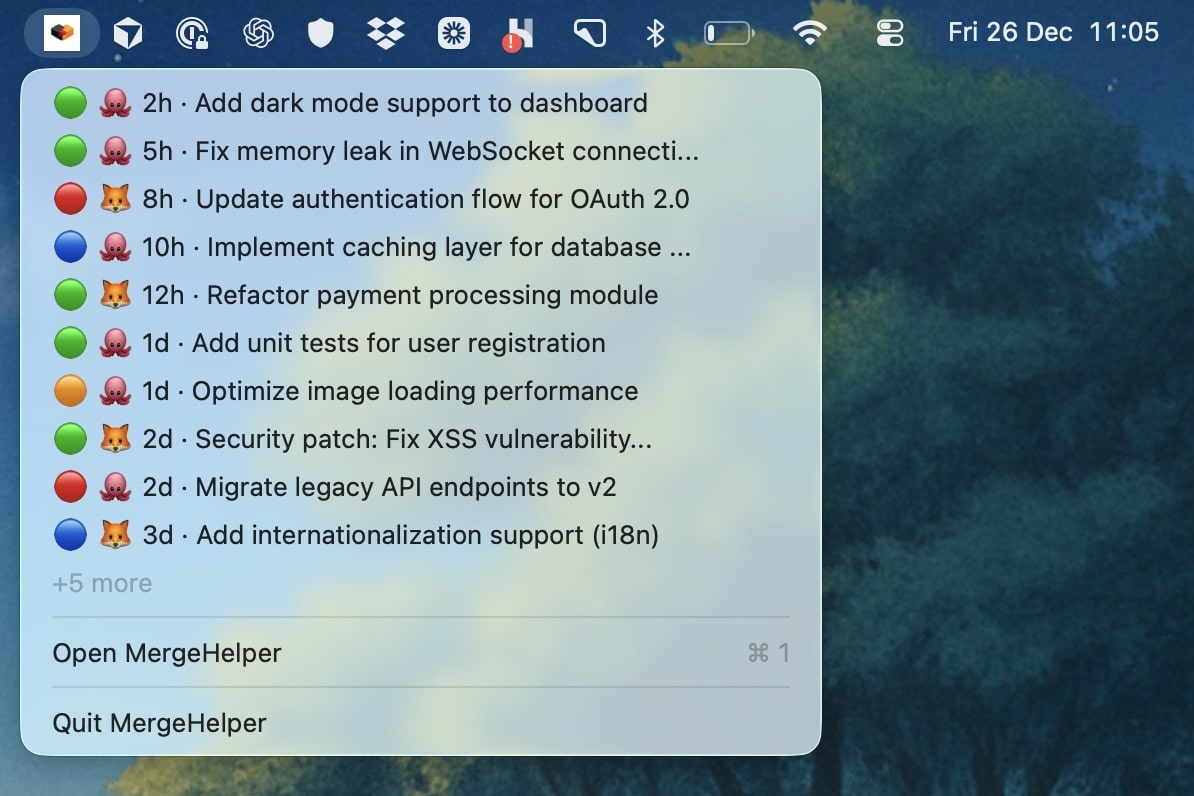
MergeHelper unifies GitHub and GitLab PRs/MRs with rich status context.
PullRequestMenu provides simple, quick access to GitHub pull requests.
Detailed feature breakdown
Platform coverage and focus
PullRequestMenu is built exclusively for GitHub. It connects to GitHub.com and GitHub Enterprise to show your pull requests in the menubar. If your team is GitHub-only and you want a simple, focused tool, the single-platform approach keeps things straightforward.
MergeHelper supports both GitHub and GitLab. If your team uses both platforms, MergeHelper eliminates the need for separate tools or browser tabs by showing all PRs and MRs in one unified list. This is the primary value: unification across platforms without context switching.
Design philosophy and simplicity
PullRequestMenu emphasizes simplicity and quick access. It is designed to be a lightweight tool that gets out of your way. You see your pull requests, click through to GitHub, and handle the work there. The tool does not try to add extra features or complexity beyond basic PR listing.
MergeHelper shares a minimal design philosophy but applies it to a more comprehensive workflow. The interface is clean and focused, but the content includes status context, CI, approvals, age, and build log access to help you prioritize review work. It balances simplicity with usefulness.
Feature depth and metadata
PullRequestMenu provides basic pull request information: title, repository, and a link to GitHub. It is designed to be a quick-access tool rather than a comprehensive review dashboard. If you prefer to do all your review work in the GitHub web interface and just need a reminder of what is open, this simplicity is an advantage.
MergeHelper surfaces more context: PR and MR status, CI, approvals, age, author, and review state. This helps you prioritize what to review next without needing to click through to each item first, and you can jump into build logs when needed. The metadata is presented in a minimal, scannable format so the interface stays clean.
Update frequency and interaction
PullRequestMenu checks for updates and keeps your PR list current. The interaction model is simple: you check the menubar when you have time, see what is open, and click through to GitHub to handle the work. The tool stays lightweight and fast.
MergeHelper uses smart polling to keep both GitHub and GitLab lists up to date. You can click through to the review page on either platform, and the app handles the navigation seamlessly. The update cadence is tuned to balance responsiveness with battery life and API rate limits.
Enterprise and self-hosted support
PullRequestMenu typically supports GitHub Enterprise, which is essential for teams using GitHub in on-premise or private cloud environments. You can configure custom URLs and credentials to connect to your internal GitHub server.
MergeHelper supports both GitHub Enterprise and self-hosted GitLab instances. If your organization uses both platforms in enterprise or self-hosted configurations, MergeHelper can unify those environments in one app. PullRequestMenu stays focused on GitHub only.
Workflow examples
If you work exclusively on GitHub and want the simplest possible menubar tool, PullRequestMenu is designed for that workflow. You check the menubar when you have time, see what PRs are open, and click through to GitHub to review. The tool stays out of your way and focuses on quick access.
If your team splits work between GitHub and GitLab, PullRequestMenu stays focused on GitHub. You would still need another tool or browser tabs for GitLab, which reintroduces context switching. MergeHelper shows all PRs and MRs in one unified list.
If your primary workflow is code review and you want more context to prioritize what to review next, MergeHelper's metadata and status indicators make that easier. PullRequestMenu stays minimal, which is good for simplicity but provides less context for decision-making.
Setup and security
PullRequestMenu connects to GitHub using a personal access token with appropriate scopes. For GitHub Enterprise, you configure the instance URL and provide credentials. Data is typically handled locally on your Mac, which keeps your pull request information private and fast.
MergeHelper requires tokens for both GitHub and GitLab if you use both platforms. All credentials are stored in the macOS Keychain, and data processing happens locally on your device. The app does not collect usage analytics or send your data to external servers.
Why choose MergeHelper
MergeHelper is a menubar app that unifies GitHub and GitLab pull requests and merge requests in one place. If your team uses both platforms, the unified list reduces context switching and keeps your entire review queue, CI, approvals, and build logs in one interface.
Even if you primarily use GitHub today, MergeHelper provides flexibility for the future. If your organization adopts GitLab for new projects or collaborates with external teams that use GitLab, you will not need to change tools or manage multiple apps.
- ✓Unified GitHub and GitLab PR/MR tracking in one menubar app
- ✓Rich status, CI, and approval context for prioritizing review work
- ✓Future-proof if your team adopts GitLab later
Why choose PullRequestMenu
PullRequestMenu is a solid choice if you work exclusively on GitHub and want the simplest possible menubar tool. It provides quick access to your pull requests without adding extra features or complexity.
If you prefer to do all your review work in the GitHub web interface and just need a lightweight reminder of what is open, PullRequestMenu's minimalism is an advantage. It stays out of your way and focuses on one thing: quick access to your GitHub PRs.
- ✓Simple, lightweight GitHub PR tracking
- ✓Minimal feature set focused on quick access
- ✓GitHub and GitHub Enterprise support
Pricing comparison
MergeHelper
Free for up to 3 concurrent PRs/MRs.
$12 one-time purchase unlocks unlimited tracking with lifetime updates.
PullRequestMenu
Check the PullRequestMenu website for current pricing details.
Compare more apps
The bottom line
PullRequestMenu is a good fit for GitHub-only teams who want the simplest possible menubar tool with quick access to pull requests. MergeHelper is for developers who need a unified view of pull requests and merge requests across GitHub and GitLab.
If you only use GitHub and prefer maximum simplicity, PullRequestMenu's minimalism is a good fit. If you use both platforms or need more context to prioritize review work, MergeHelper's unified approach reduces context switching and provides richer metadata for decision-making. Teams that split work between GitHub and GitLab often see the biggest benefit because MergeHelper replaces two separate tools with one centralized list.