
MergeHelper vs. Gitify
Gitify is a popular open-source GitHub notifications app. MergeHelper is focused on pull requests and merge requests across both GitHub and GitLab with live CI and approvals. Here is how they stack up.
Gitify is built around the GitHub notifications inbox. If you are already living inside GitHub notifications and want a lightweight menu bar app that works across macOS, Windows, and Linux, Gitify can be a solid choice. It keeps you aware of mentions, issues, and pull request activity and lets you filter the stream so you can focus on what matters.
MergeHelper solves a different problem. It is a macOS menubar app that shows every pull request and merge request you care about in one unified list with live CI, approvals, and build log access. It is built for teams who have work split between GitHub and GitLab and need a single, real-time view instead of two separate notification feeds.
If your workflow is GitHub-only and you want a broad notifications inbox, Gitify may feel familiar and flexible. If your day revolves around reviewing and merging work across platforms, MergeHelper stays closer to the PR/MR lifecycle with a more focused review view.
The short version: Gitify is a cross-platform GitHub notification hub. MergeHelper is a focused, Mac-first review companion built for GitHub and GitLab together.
Quick comparison
| Feature | MergeHelper | Gitify |
|---|---|---|
| GitHub support | ✓ | ✓ |
| GitLab support | ✓ | - |
| Menubar app | ✓ | ✓ |
| Cross-platform (Windows/Linux) | - | ✓ |
| PR/MR focused list | ✓ | - |
| GitHub notifications inbox | - | ✓ |
| Open source | - | ✓ |
| Pricing | Free (up to 3 PRs/MRs) $12 one-time for unlimited |
Free |
Screenshots
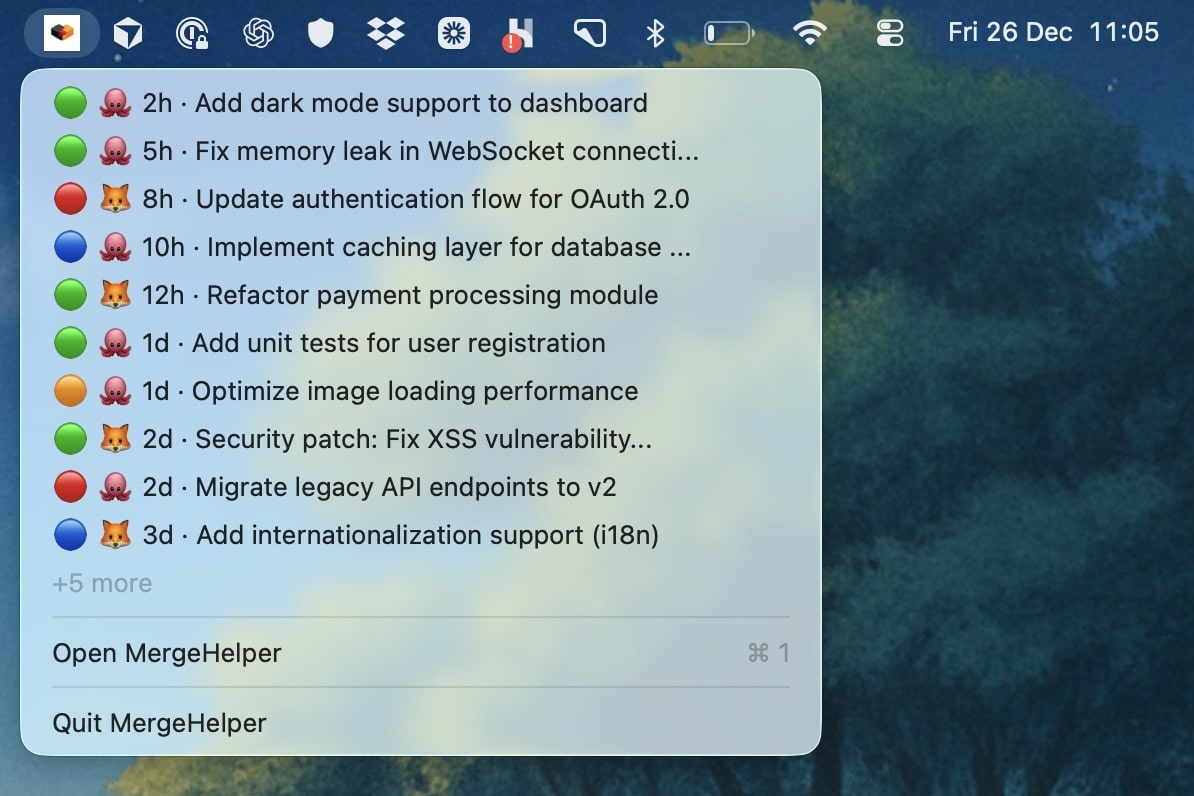
MergeHelper keeps GitHub and GitLab PRs/MRs in one list with quick status context.
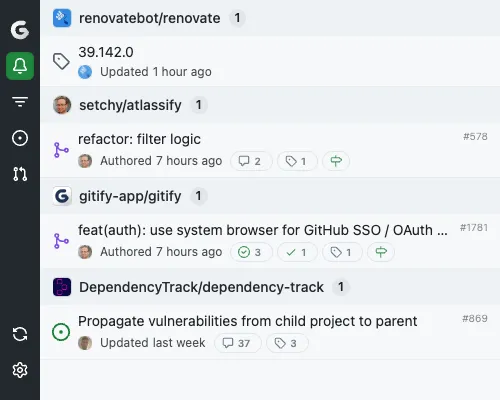
Gitify focuses on the GitHub notifications inbox and filtering for signal.
Detailed feature breakdown
Scope: notifications inbox vs PR/MR workflow
Gitify is built on the GitHub notifications stream, so it captures more than pull requests: issues, mentions, reviews, and general activity all appear in the list. That breadth is useful if your job spans a mix of repos and you want a single place to triage everything coming from GitHub.
MergeHelper is intentionally narrower. It focuses on pull requests and merge requests because those are the highest-stakes events in most developer workflows. The list is curated around PR/MR event notifications, review and merge status, live CI, and approvals rather than every notification. This keeps the view shorter and more actionable when you are trying to decide what to review or merge next.
Platform coverage and account flexibility
Gitify supports macOS, Windows, and Linux, and it works with GitHub Cloud and GitHub Enterprise accounts. That makes it a good option for teams using mixed operating systems or for developers who move between machines and want consistent behavior everywhere.
MergeHelper is macOS-only but it bridges GitHub and GitLab in one place. If your work lives in both platforms, the value is not just multi-account access, it is the ability to see every PR and MR side by side without jumping between tools.
Filtering and signal control
Gitify emphasizes filtering and customization. You can filter down the notifications stream to just the signals you care about and tune your notification settings to match your pace. If you already rely on GitHub notifications as your command center, Gitify makes that experience faster and less noisy.
MergeHelper offers lightweight filtering and a clean, minimal layout. The list stays focused on review-ready items with CI, approvals, and build logs available at a glance. It does not try to be a replacement for GitHub notifications, which is often a feature, not a limitation.
Update cadence and UX
Gitify keeps you informed with notifications in the menu bar and native OS alerts. It is designed to feel always-on without requiring a full browser tab, which makes it a good fit for developers who want a gentle background feed.
MergeHelper uses smart polling and prioritizes a fast, low-distraction interface. It is optimized for a review-first workflow where the list itself is the primary tool, not just a proxy for the web inbox.
Context and actions
Gitify surfaces notification reasons like mentions, review requests, or comment activity and then routes you back to GitHub to handle the work. That is helpful for triage, especially when you need to respond to a wide variety of events across many repositories.
MergeHelper keeps the list anchored on PRs and MRs and highlights status, approvals, CI, and age so you can prioritize reviews quickly. It is less about inbox management and more about keeping the review queue moving.
Workflow examples
If you are a GitHub-only maintainer who spends the day responding to issues, review comments, and mentions across many repos, Gitify can act like a dedicated inbox. You can skim the notifications, filter down to what needs attention, and keep the feed open without living in a browser tab. It is a comfortable fit when your workflow is broad and notification-driven.
If you are on a team that splits work between GitHub and GitLab, the Gitify model stays GitHub-focused. MergeHelper is built for that mixed environment and keeps every PR and MR in the same list, which makes code review feel like one unified queue instead of two separate inboxes.
If your day is review-heavy, MergeHelper is intentionally optimized for that. You see which PRs are open, which ones are aging, which ones are ready to merge, and whether CI and approvals are green. The app stays in the menubar and gives you direct links to the review page and build logs without forcing you to sift through unrelated notifications.
Setup and security
Gitify connects using a GitHub personal access token and mirrors the notifications you already get on GitHub. That keeps setup straightforward: generate a token, paste it in, and you are ready to go. Because Gitify is open source, you can inspect how it handles data and customize it if your team has special requirements.
MergeHelper connects to both GitHub and GitLab and stores credentials in the macOS Keychain. It processes PR and MR data locally and does not collect usage analytics. If you want a Mac-native tool that keeps data on your device while giving you a unified review list, that approach is a good match.
Why choose MergeHelper
MergeHelper is built for developers who want a single, unified view of pull requests and merge requests across GitHub and GitLab. If you are tired of managing two separate notification systems, the unified list can be a meaningful time saver.
The UI is intentionally minimal and tuned for quick review decisions. You see what is open, what is stale, what needs attention, and whether CI and approvals are ready, without a dense notification backlog competing for focus.
- ✓Unified GitHub and GitLab list in one menubar app
- ✓Review-centric workflow with CI and approval context at a glance
- ✓Mac-native experience with a clean, distraction-free design
Why choose Gitify
Gitify is a good fit when GitHub is your primary home and you want a dedicated notifications inbox that works on any desktop operating system. It is open source, actively maintained, and focused on the breadth of GitHub activity, not just pull requests.
If you are already using GitHub notifications as your task list, Gitify makes that workflow fast and customizable. You can filter, search, and tune alert behavior to reduce noise without abandoning the GitHub inbox model.
- ✓Cross-platform support for macOS, Windows, and Linux
- ✓GitHub notifications inbox with filtering and customization
- ✓Free and open source
Pricing comparison
MergeHelper
Free for up to 3 concurrent PRs/MRs.
$12 one-time purchase unlocks unlimited tracking with lifetime updates.
Gitify
Free and open source.
Available for macOS, Windows, and Linux with GitHub and GitHub Enterprise support.
Can you use both?
Yes. A common setup is to keep Gitify running for the broad GitHub notification stream while using MergeHelper as the focused review queue. That gives you a high-signal list of PRs and MRs to review without giving up the wider context of issues and mentions that Gitify surfaces.
If you do that, MergeHelper effectively becomes the place you make merge decisions, while Gitify stays as your inbox for everything else. This dual setup is especially useful for engineers who review across GitHub and GitLab but still need to keep a pulse on GitHub issues and discussions.
Compare more apps
The bottom line
Gitify is a solid option for developers who live in GitHub notifications and want a cross-platform app to keep up with everything. MergeHelper is for developers who want a focused PR/MR workflow and a unified view across GitHub and GitLab.
If you only need GitHub notifications, Gitify is a good pick. If you need one place to track reviews across platforms, MergeHelper can save time every day. Teams that split work between GitHub and GitLab often see the biggest gains because the unified list replaces two separate inboxes. If you expect to expand to GitLab soon, starting with MergeHelper can help you avoid a later tool switch.