MergeHelper vs. CatLight
CatLight is a build status monitoring tool that tracks CI/CD pipelines, test results, and merge requests across multiple platforms. MergeHelper focuses on GitHub and GitLab PR/MR tracking with live CI and approval status. Here is how they compare.
CatLight is built for teams who need visibility into their continuous integration and deployment pipelines. It monitors build status across Jenkins, Azure DevOps, GitLab CI, GitHub Actions, and many other CI/CD platforms. It also surfaces merge request activity on GitLab, making it a comprehensive monitoring tool for the entire development lifecycle.
MergeHelper is purpose-built for code review. It tracks pull requests and merge requests across GitHub and GitLab, keeps live CI and approval status visible, and lets you open build logs right from the list. It does not replace full CI/CD dashboards, but it gives you the review-focused context you need without the broader CI/CD sprawl.
The key difference: CatLight is a build and pipeline monitoring tool that also tracks merge requests on GitLab. MergeHelper is a code review tool that tracks PRs and MRs on both GitHub and GitLab with live CI, approvals, and build log access tied to each review item.
If you need comprehensive CI/CD pipeline visibility across multiple platforms, CatLight is designed for that. If you need a unified PR and MR tracking tool for GitHub and GitLab, MergeHelper stays focused on code review.
Quick comparison
| Feature | MergeHelper | CatLight |
|---|---|---|
| GitHub PR tracking | ✓ | - |
| GitLab MR tracking | ✓ | ✓ |
| Unified GitHub + GitLab list | ✓ | - |
| CI/CD pipeline monitoring | - | ✓ |
| Multi-platform CI/CD support | - | ✓ |
| Cross-platform (Windows/Linux) | - | ✓ |
| macOS menubar app | ✓ | ✓ |
| Pricing | Free (up to 3 PRs/MRs) $12 one-time for unlimited |
Free and paid plans |
Screenshots
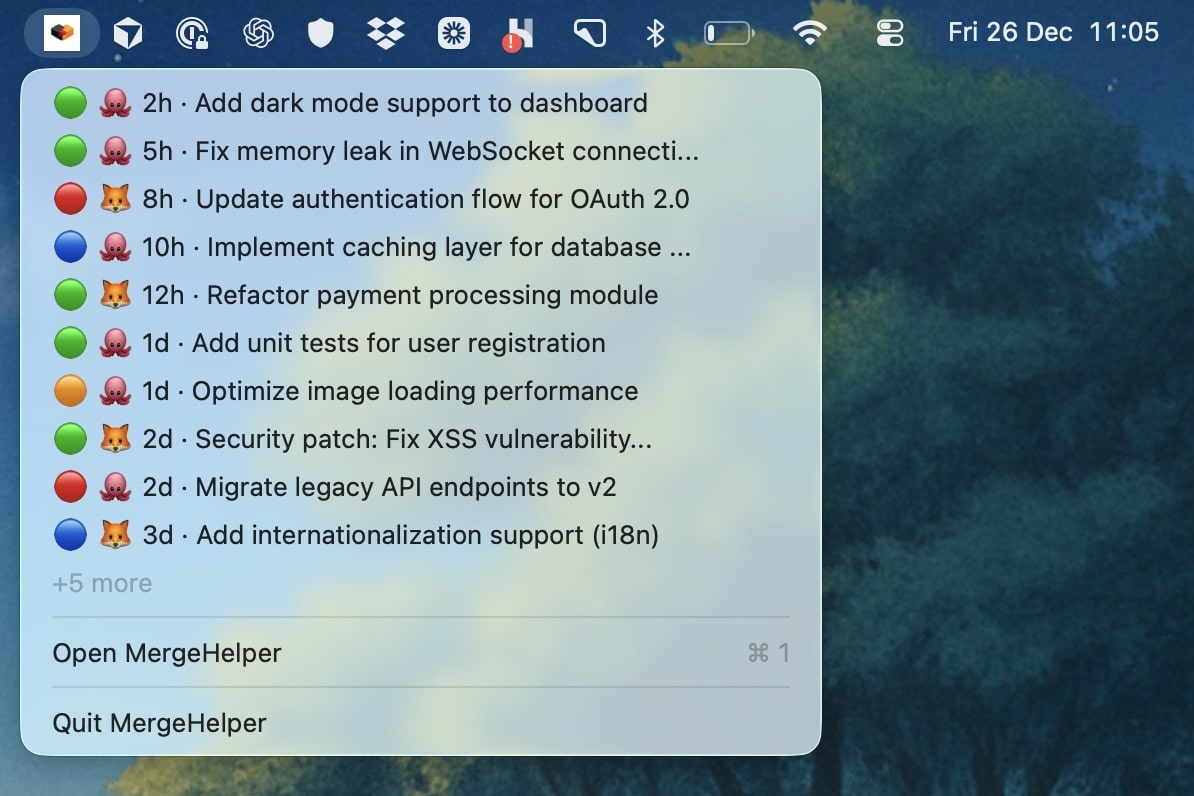
MergeHelper focuses on PR and MR tracking across GitHub and GitLab.
CatLight monitors builds, tests, and deployments across multiple platforms.
Detailed feature breakdown
Scope and primary use case
CatLight is designed to give you visibility into your CI/CD pipelines. It monitors Jenkins, Azure DevOps, GitLab CI, GitHub Actions, TeamCity, and many other platforms to show you which builds are passing, which tests are failing, and which deployments are in progress. It also surfaces GitLab merge requests, but that is one feature among many, not the primary focus.
MergeHelper is narrowly focused on pull requests and merge requests. It does not monitor CI/CD systems separately across an entire organization, but it does surface live CI and approval status for each PR/MR and links to the relevant build logs. The result is a unified list of GitHub and GitLab review items with the context you need to act quickly.
Platform and tooling coverage
CatLight integrates with a wide range of CI/CD and source control platforms. It supports Jenkins, Azure DevOps, GitLab, TeamCity, CircleCI, AppVeyor, and more. If your team uses multiple build systems or CI tools, CatLight can unify them into one monitoring dashboard. This breadth is valuable for teams with complex tooling stacks.
MergeHelper focuses exclusively on GitHub and GitLab. It does not integrate with other source control platforms or CI/CD systems beyond what is available through the GitHub and GitLab APIs. The value is in the depth of GitHub and GitLab support, not the breadth of integrations.
Operating system support
CatLight is cross-platform and runs on Windows, macOS, and Linux. If your team uses a mix of operating systems or if you work on different machines with different OSes, CatLight provides a consistent experience everywhere.
MergeHelper is macOS-only. If you are on Mac and want a native menubar experience, MergeHelper is optimized for that environment. If you need Windows or Linux support, you will need a different tool.
User interface and information density
CatLight surfaces a lot of information: build status, test results, merge request activity, and deployment progress. The interface is designed to give you a comprehensive view of your development pipeline, which means more data on screen and more configuration options to tune what you see.
MergeHelper is intentionally minimal. The list shows PRs and MRs, their status, approvals, CI state, and age. There is less to configure and less noise on screen, which makes the app faster to scan and easier to navigate when you just want to know what needs review.
Team size and organizational complexity
CatLight is often used in larger organizations or teams with complex CI/CD setups. If you have multiple build servers, multiple CI platforms, and many repositories, CatLight helps you monitor everything from one place. It scales well when you need comprehensive visibility across a large infrastructure.
MergeHelper is designed for individual developers and small to medium-sized teams who want a simple, focused tool for code review. It does not try to scale to large enterprise environments with complex monitoring needs. The app stays simple and fast, which works well when the primary goal is staying on top of PR and MR activity.
Workflow examples
If you are a DevOps engineer or release manager who needs to monitor builds, tests, and deployments across many systems, CatLight is built for that workflow. You can see which pipelines are failing, which tests are broken, and which deployments are blocked, all from one interface.
If you are a developer whose primary job is writing and reviewing code, CatLight may show you more information than you need. The build status for every pipeline in your organization is useful context, but it is not the same as knowing which PRs and MRs need your review right now. MergeHelper stays focused on that specific workflow with live CI, approvals, and quick access to build logs for each review item.
If your team splits work between GitHub and GitLab, CatLight tracks merge requests on GitLab but not pull requests on GitHub. You would still need another tool or browser tabs for GitHub, which reintroduces context switching. MergeHelper shows all PRs and MRs in one list.
Setup and security
CatLight connects to multiple platforms using API keys, personal access tokens, or OAuth, depending on the platform. You configure each integration separately, and the app stores credentials securely on your device. Because CatLight supports so many platforms, setup can take longer if you need to connect multiple systems.
MergeHelper requires tokens for GitHub and GitLab. All credentials are stored in the macOS Keychain, and data processing happens locally on your device. Setup is straightforward: generate tokens, paste them in, and you are ready to go. The app does not collect usage analytics or send your data to external servers.
Why choose MergeHelper
MergeHelper is a menubar app that unifies GitHub and GitLab pull requests and merge requests in one place. If your team uses both platforms and your primary workflow is code review, MergeHelper reduces context switching while keeping live CI, approval status, and build logs close to each review item.
The app is optimized for developers who spend significant time reviewing code. You get a clean, minimal interface with the information you need to decide what to review next, including CI and approval state, without the broader CI/CD monitoring that may not be relevant to your day-to-day work.
- ✓Unified GitHub and GitLab PR/MR tracking in one menubar app
- ✓Focused on code review, not CI/CD monitoring
- ✓Simple, minimal interface optimized for Mac
Why choose CatLight
CatLight is a strong choice if you need comprehensive CI/CD pipeline monitoring across multiple platforms. It gives you visibility into builds, tests, deployments, and merge requests from one interface, which is valuable for DevOps teams and release managers.
If you work on Windows or Linux, or if your team uses multiple build systems and CI platforms, CatLight's breadth and cross-platform support make it a strong fit. It scales well for larger organizations with complex tooling stacks.
- ✓Comprehensive CI/CD pipeline monitoring
- ✓Multi-platform support (Jenkins, Azure, GitLab, GitHub Actions, etc.)
- ✓Cross-platform (Windows, macOS, Linux)
Pricing comparison
MergeHelper
Free for up to 3 concurrent PRs/MRs.
$12 one-time purchase unlocks unlimited tracking with lifetime updates.
CatLight
Free and paid plans available.
Check the CatLight website for current pricing and enterprise options.
Compare more apps
The bottom line
CatLight is a good fit for teams that need comprehensive CI/CD pipeline monitoring across multiple platforms. MergeHelper is for developers who need a focused, unified view of pull requests and merge requests across GitHub and GitLab.
If your primary need is build and deployment visibility, CatLight's breadth is a strong match. If your primary workflow is code review and you use both GitHub and GitLab, MergeHelper's focused approach reduces context switching and keeps you productive. The two tools serve different audiences: CatLight for DevOps and release management, MergeHelper for developers focused on reviewing and merging code.